
Artificial Intelligence is rapidly changing how software is built, tested, and maintained. One of the newest tools helping developers work more efficiently is Claude Code, a terminal-based AI assistant developed by Anthropic. Unlike traditional AI chat interfaces that simply generate text, Claude Code can interact directly with your local development environment, making it a powerful companion for coding tasks.
What is Claude Code?
Claude Code is an AI-powered coding assistant that runs inside your terminal. It gives developers access to Anthropic’s Claude models while allowing them to work directly within their projects and file systems.
Instead of switching between a browser and an editor, developers can interact with Claude Code from the command line. It can generate code, explain existing code, identify bugs, suggest improvements, and even make changes across multiple files within a project.
What makes Claude Code different from a standard chatbot is its ability to perform actions rather than simply provide suggestions. It can read files, create new files, modify existing code, and organize project structures while keeping the developer involved in the decision-making process.
Why Developers Use Claude Code
Many AI tools can generate code snippets, but Claude Code goes a step further by acting as an AI coding partner.
For example, a developer can describe an entire application in a single prompt, and Claude Code can create the required folders, generate source files, and build a working prototype. Instead of manually guiding every step, the developer focuses on the goal while Claude Code determines the tasks required to achieve it.
This approach is often described as agentic development, where the AI is capable of planning and executing multiple actions to complete a request.
Some common use cases include:
- Creating application prototypes
- Explaining unfamiliar code
- Reviewing code for security issues
- Fixing bugs across large codebases
- Refactoring existing projects
- Generating documentation
Installing Claude Code
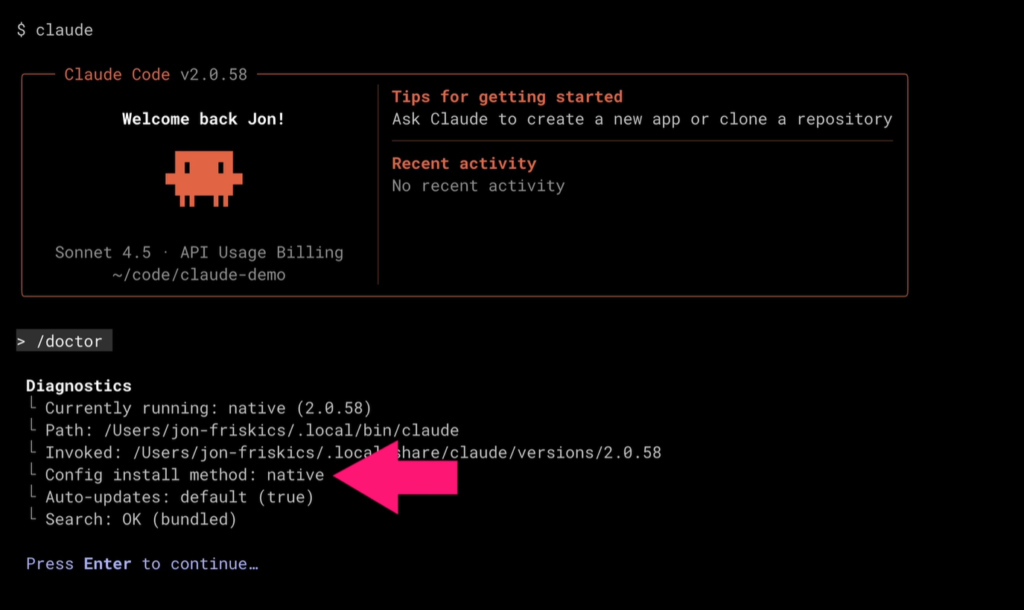
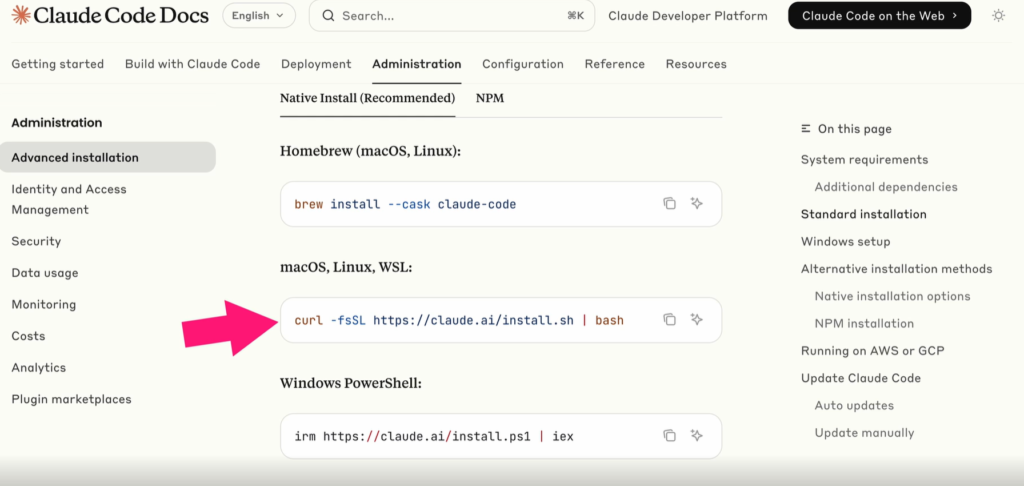
Claude Code supports Windows, macOS, and Linux environments. The installation process varies depending on the operating system, but most developers can install it using the official installation script or through npm.
After installation, Claude Code can be launched directly from a terminal by navigating to a project directory and running the Claude command.
The first launch typically includes:
- Selecting interface preferences
- Logging into a Claude account
- Connecting billing or subscription information
- Configuring the local environment
Once connected, developers can begin interacting with Claude Code immediately.
Useful commands include:
/status– Displays account and connection information/usage– Shows token consumption and usage limits/login– Reconnects or changes authentication methods/exit– Closes the current Claude Code session
Understanding the Claude Code Interface
Although Claude Code runs in a terminal window, it provides a surprisingly interactive experience.
When a prompt is submitted, Claude Code often creates a plan and breaks the task into multiple steps. During execution, it displays progress updates, identifies the current task, and explains what actions are being performed.
Developers can monitor:
- Current execution steps
- Planned tasks
- Tool usage
- File modifications
- Processing time
The interface also allows tasks to be interrupted, resumed, or modified as needed.
Built-In Tools
One of Claude Code’s most powerful capabilities is its tool system.
Instead of responding only with text, Claude Code can use tools to interact with your project. Common built-in tools include:
Read Tool
Allows Claude Code to examine project files and understand the existing codebase before generating responses.
Write Tool
Creates new files or modifies existing files within a project.
Web Search Tool
Retrieves information from online sources to answer questions or gather documentation.
These tools enable Claude Code to perform practical development tasks instead of simply offering theoretical guidance.
Claude Code Permissions
Security is an important aspect of Claude Code’s design.
By default, Claude Code operates in a restrictive mode. Whenever it attempts to perform actions that could modify your system, it requests permission first.
For example, if Claude wants to create or edit a file, it will ask for approval before making the change.
Developers can choose to:
- Approve a single action
- Allow similar actions for the current session
- Deny the request
This permission model ensures that users maintain control over their projects while still benefiting from automation.
Claude Code Memory
Claude Code uses a context window to maintain awareness of the ongoing conversation and project state.
This context includes:
- System instructions
- Tool definitions
- Conversation history
- Project-specific information
As more interactions occur, the context grows. When the context approaches its limit, Claude Code automatically summarizes older information to preserve important details while freeing up space for new interactions.
Several commands help manage memory:
/context– Displays context usage/export– Exports conversation history/clear– Starts with a clean context
Many developers also use the CLAUDE.md file to provide persistent project information. Contents of this file are automatically included in future prompts, helping Claude maintain awareness of project requirements and coding standards.
Claude Code Hooks
Hooks provide a way to automate actions during specific stages of Claude Code’s workflow.
Unlike AI-generated responses, hooks execute in a predictable and repeatable manner.
Two commonly used hooks are:
PreToolUse
Runs before a tool is executed.
Example use cases:
- Enforcing coding standards
- Adding validation checks
- Modifying tool behavior
PostToolUse
Runs after a tool completes its task.
Example use cases:
- Formatting code automatically
- Running linting tools
- Executing test suites
Hooks allow teams to integrate Claude Code into existing development workflows while maintaining consistency and governance.
Final Thoughts
Claude Code represents a shift from traditional AI chat interfaces toward AI-powered development agents. By combining advanced language models with file access, tool usage, permissions, memory management, and automation capabilities, it helps developers move from idea to implementation much faster.
Whether you’re building prototypes, reviewing code, fixing bugs, or exploring a new codebase, Claude Code provides a practical way to bring AI directly into your development workflow without leaving the terminal.


